> For the complete documentation index, see [llms.txt](https://docs.allocations.com/llms.txt). Markdown versions of documentation pages are available by appending `.md` to page URLs; this page is available as [Markdown](https://docs.allocations.com/investor-onboarding/how-to-invest.md).
# How to Invest?
### Step 1: Review the Deal Information
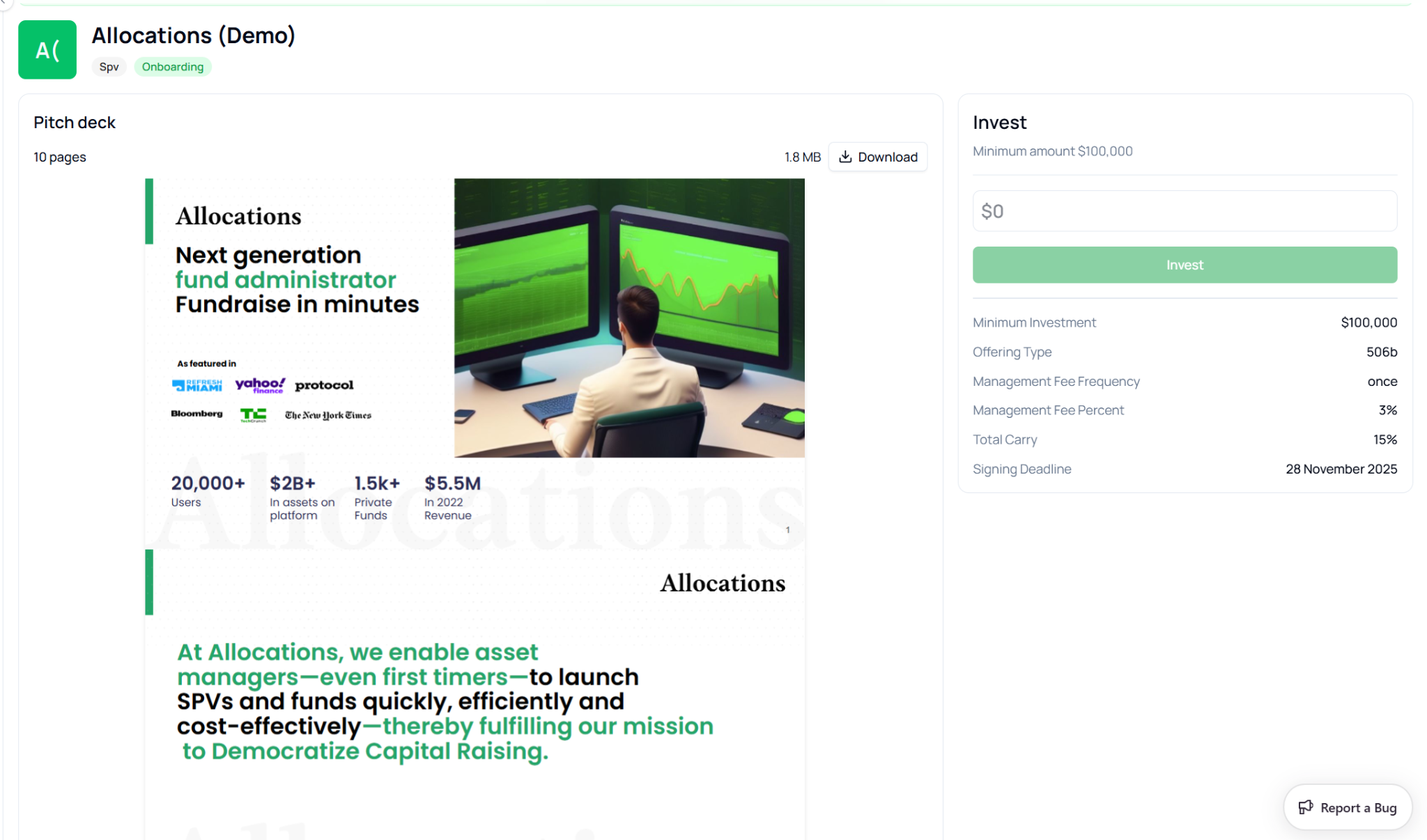
Before investing, investors can review the deal details and supporting materials directly on the deal page.
The page typically includes a **pitch deck**, which provides an overview of the investment opportunity, including the company background, financial information, and strategic outlook. Investors can preview the deck within the platform or download it for offline review.
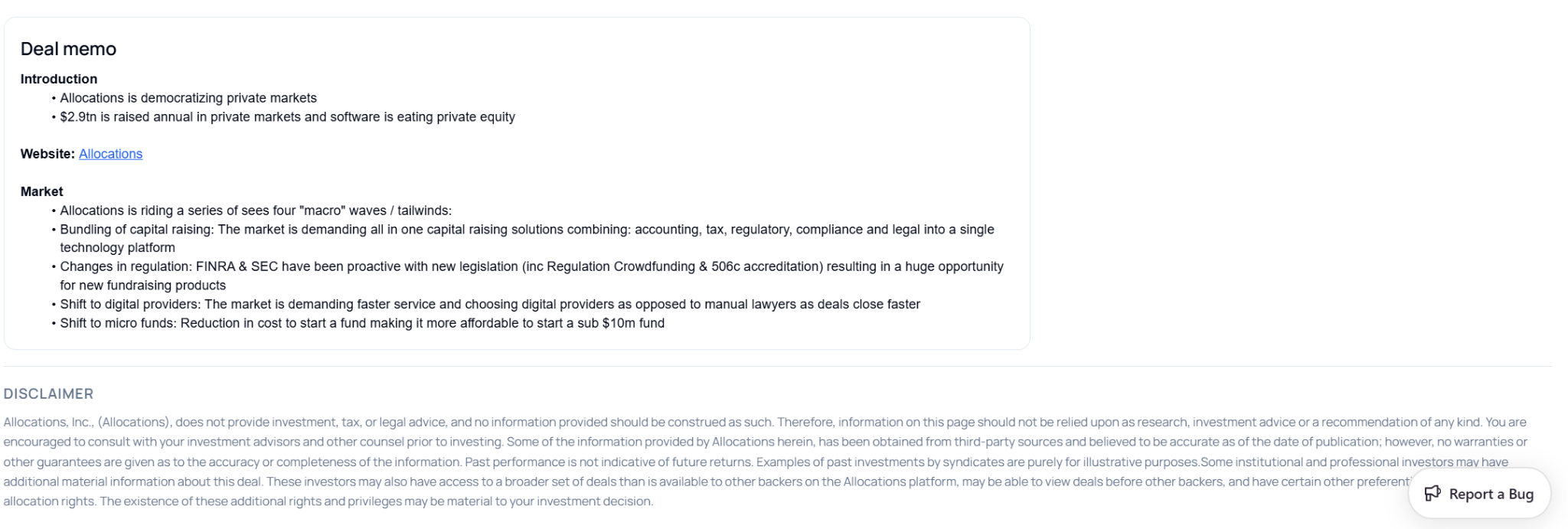
Below the pitch deck, a **deal memo** may be provided. The memo generally includes information such as:
* The company introduction
* Market opportunity and industry trends
* Investment thesis
* Supporting research and insights
This information helps investors understand the context of the opportunity before committing capital.
On the right side of the page, the **Invest panel** displays key investment terms including:
* Minimum investment amount
* Offering type
* Management fee structure
* Carry percentage
* Signing deadline
These parameters define the structure and terms of the investment.
### Step 2: Enter the Investment Amount
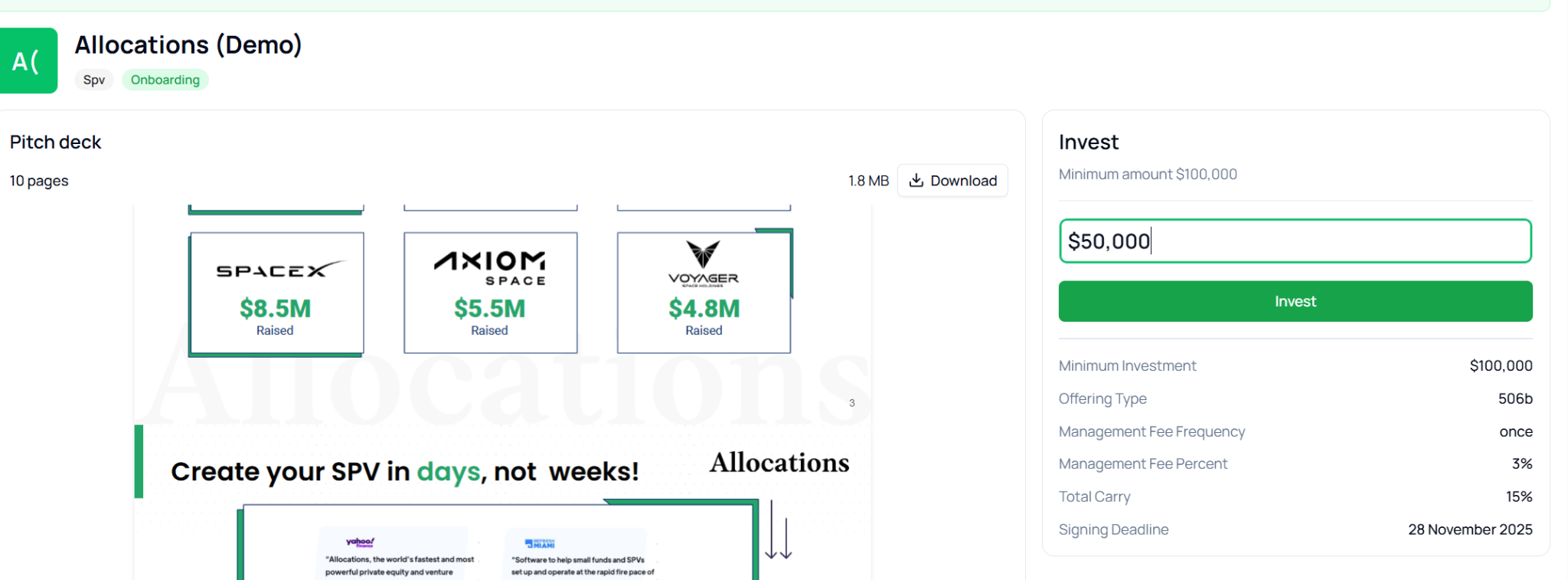
Once the investor decides to proceed, they can enter the amount they wish to invest in the **Investment Amount** field.
The platform automatically checks the amount against the **minimum investment requirement** defined for the deal. If the entered amount is below the minimum threshold, the investment cannot proceed.
After entering the desired amount, the investor can click **Invest** to continue to the investment confirmation process.
### Step 3: Select or Create an Identity
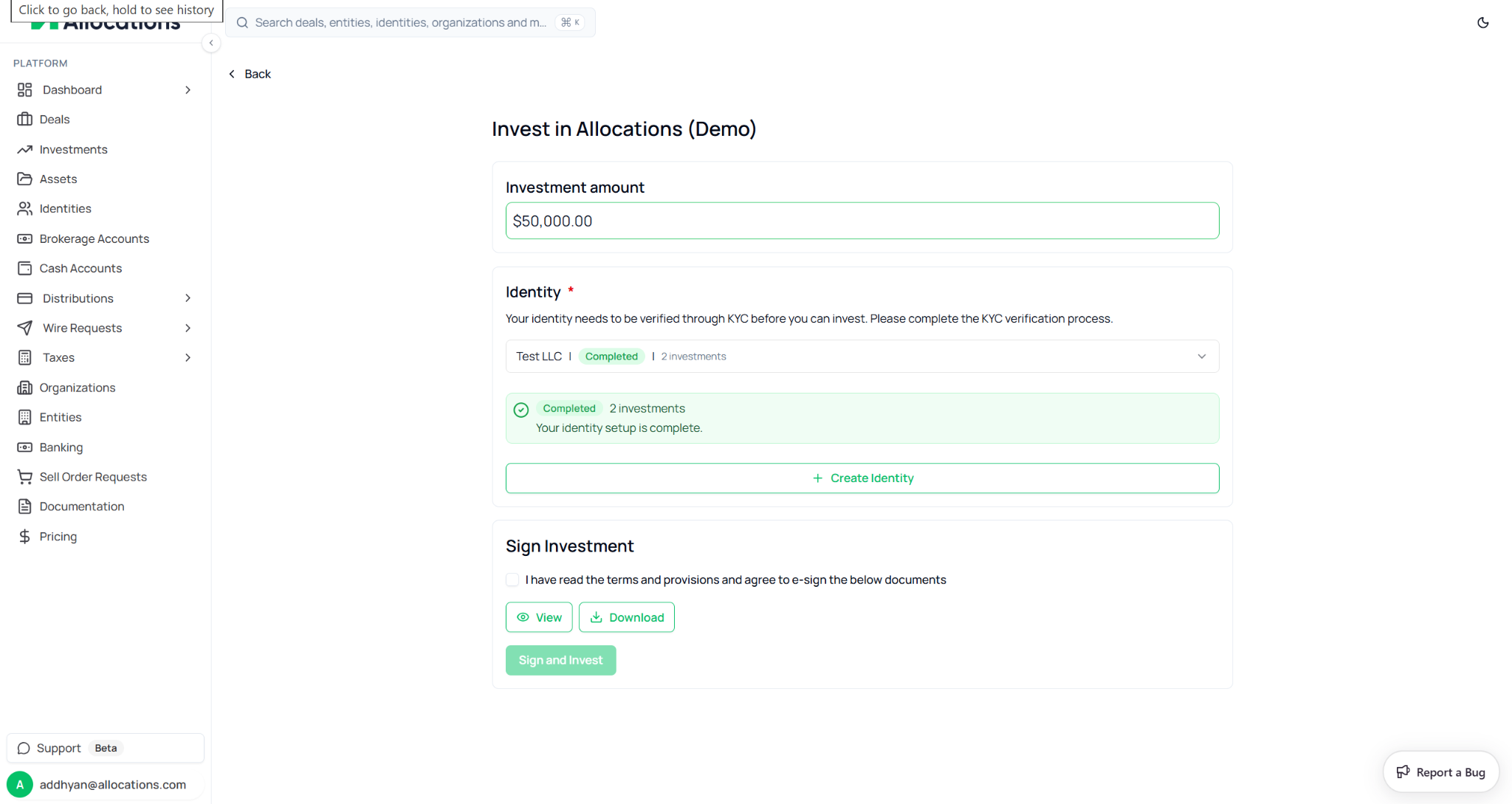
Every investment on Allocations must be associated with an **identity**, which represents the legal entity making the investment.
An identity can be:
* An individual
* A legal entity such as an LLC
* A trust
* Another investment vehicle
When proceeding with an investment, the platform prompts the investor to select an existing identity or create a new one.
If the selected identity has already completed the **Know Your Customer (KYC)** verification process, it will appear as **Completed**, allowing the investor to proceed immediately.
If an investor does not yet have an identity set up, they can create one directly from this page by selecting **Create Identity** and completing the required verification process.
This step ensures that all investments are properly attributed and compliant with regulatory requirements.
### Step 4: Review and Sign Investment Documents
Before completing the investment, investors must review and sign the required investment agreements.
These documents may include subscription agreements and other legal documents associated with the investment structure. The platform provides two options for accessing the documents:
* **View** – Opens the document for review directly in the platform.
* **Download** – Allows the investor to download a copy of the document.
Once the investor has reviewed the documents, they must confirm agreement by checking the box indicating that they have read and accept the terms and provisions.
After confirming, the **Sign and Invest** button becomes available. Clicking this button initiates the document signing process and records the investment commitment.
### Step 5: Investment Processing
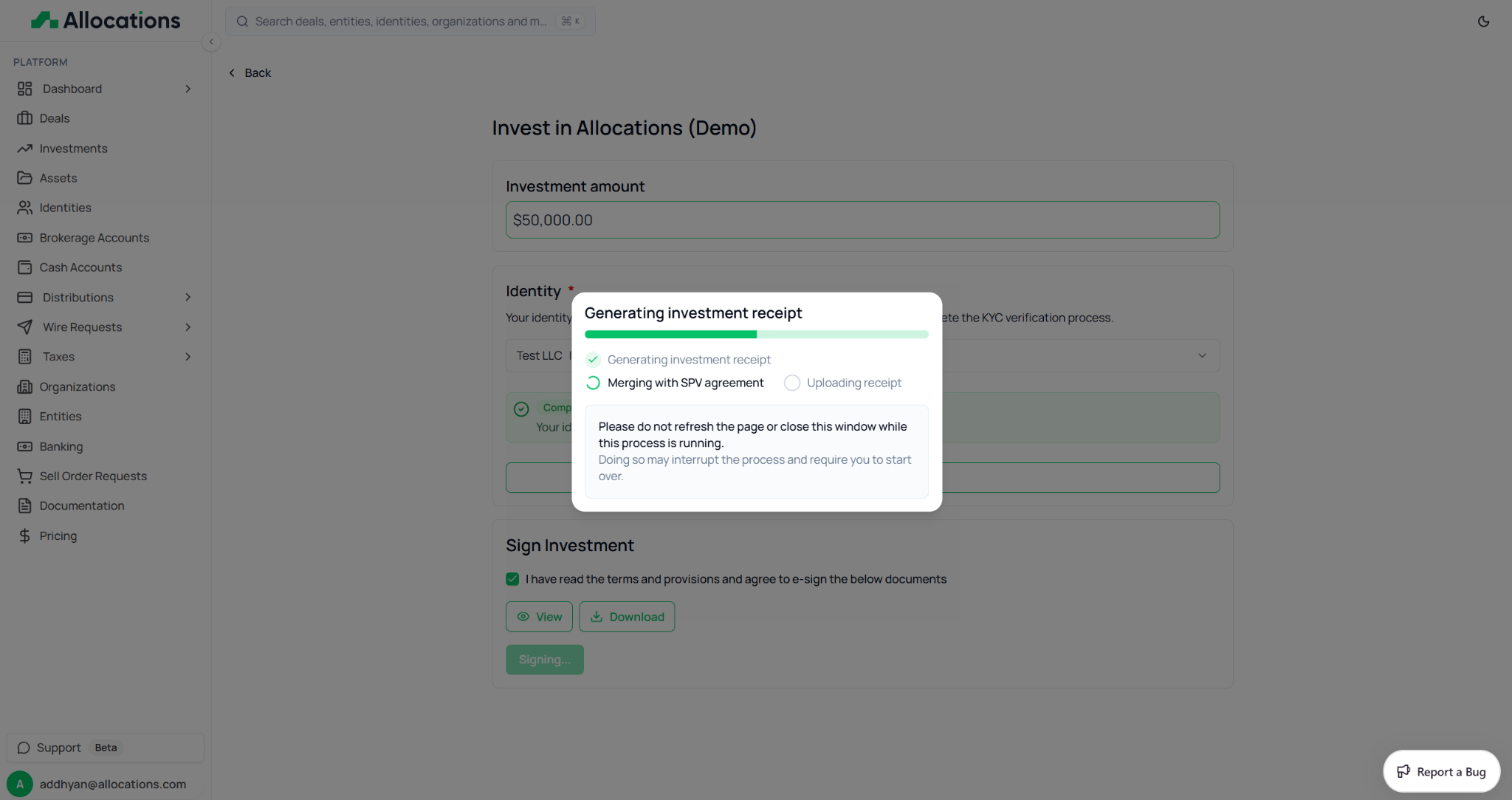
After signing the documents, the platform begins processing the investment.
During this stage, the system performs several automated actions, including:
* Generating the investment receipt
* Merging the receipt with the signed SPV agreement
* Uploading and storing the finalized documentation
A progress window may appear while these steps are completed. Investors should avoid refreshing the page or closing the window during this process to prevent interruptions.
This automated workflow ensures that all documentation is properly generated and securely stored.
### Step 6: Investment Confirmation
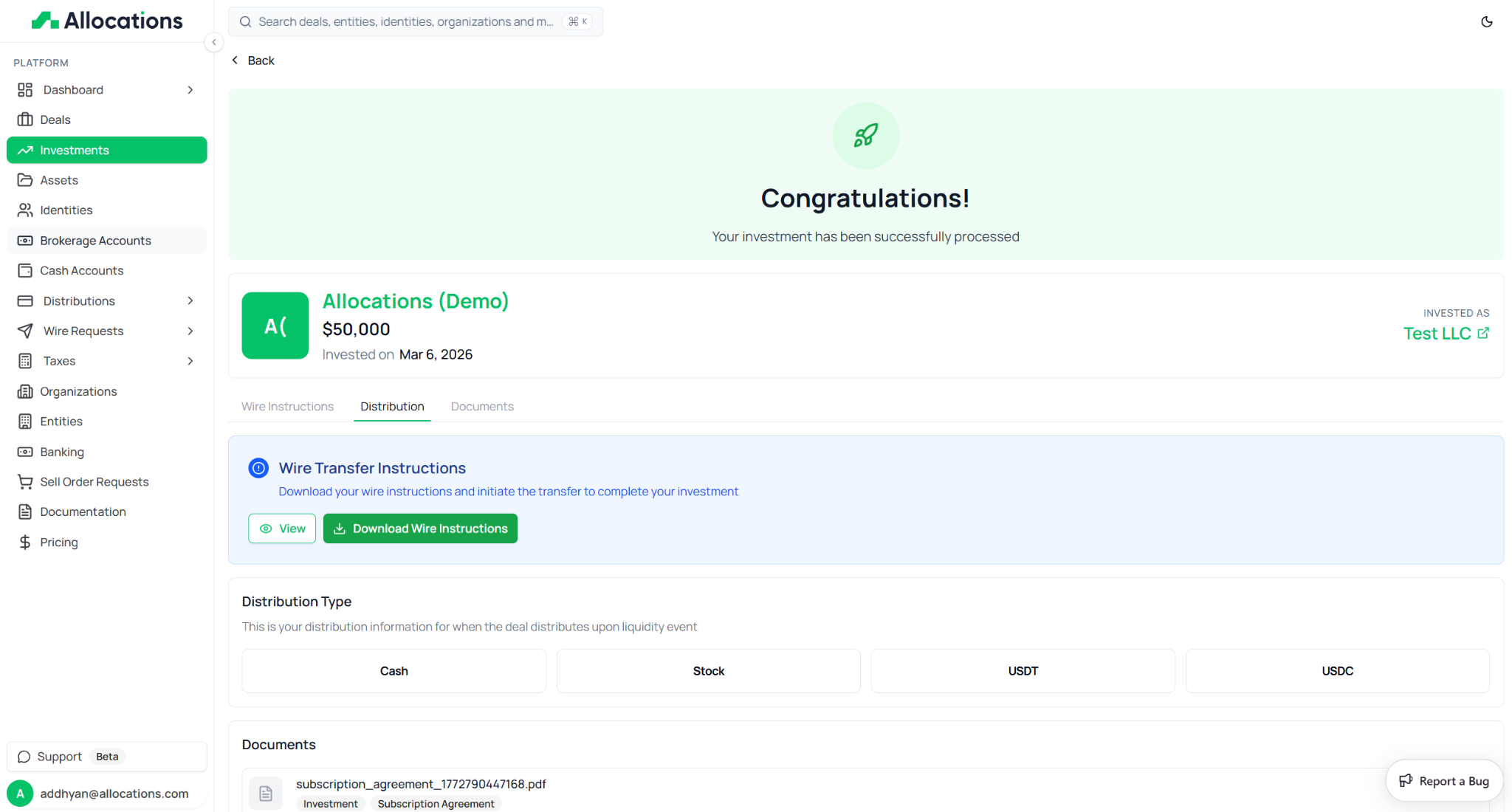
Once the investment has been successfully processed, the platform displays a confirmation message indicating that the investment is complete.
The confirmation page provides key details including:
* The investment amount
* The date of investment
* The identity used for the investment
At this stage, the investment is recorded within the platform.
### Step 7: Complete the Wire Transfer
After the investment is confirmed, the investor must complete the capital transfer.
The platform provides **Wire Transfer Instructions**, which include the necessary banking information required to send funds for the investment. Investors can either view the instructions directly or download them for reference.
To finalize the investment, the investor should initiate a wire transfer from their bank using the provided instructions.
Investors may also have the option to select their preferred **distribution method** for potential future returns.
Distribution types may include:
* Cash
* Stock
* USDT
* USDC
This selection determines how proceeds from a liquidity event or distribution will be delivered to the investor.
***
---
# Agent Instructions
This documentation is published with GitBook. GitBook is the documentation platform designed so that both humans and AI agents can read, navigate, and reason over technical content effectively. Learn more at gitbook.com.
## Querying This Documentation
If you need additional information that is not directly available in this page, you can query the documentation dynamically by asking a question.
Perform an HTTP GET request on the current page URL with the `ask` query parameter, and the optional `goal` query parameter:
```
GET https://docs.allocations.com/investor-onboarding/how-to-invest.md?ask=&goal=
```
`ask` is the immediate question: it should be specific, self-contained, and written in natural language.
`goal` is optional and describes the broader end goal you are ultimately trying to accomplish on behalf of the user. GitBook uses it to tailor the answer towards what is most useful for that goal.
The response will contain a direct answer to the question and relevant excerpts and sources from the documentation.
Use this mechanism when the answer is not explicitly present in the current page, you need clarification or additional context, or you want to retrieve related documentation sections.