> For the complete documentation index, see [llms.txt](https://docs.allocations.com/llms.txt). Markdown versions of documentation pages are available by appending `.md` to page URLs; this page is available as [Markdown](https://docs.allocations.com/brokerage-and-cash-accounts/adding-cash-account.md).
# Adding Cash Account
How to add and manage a bank account for your deal's capital operations on Allocations
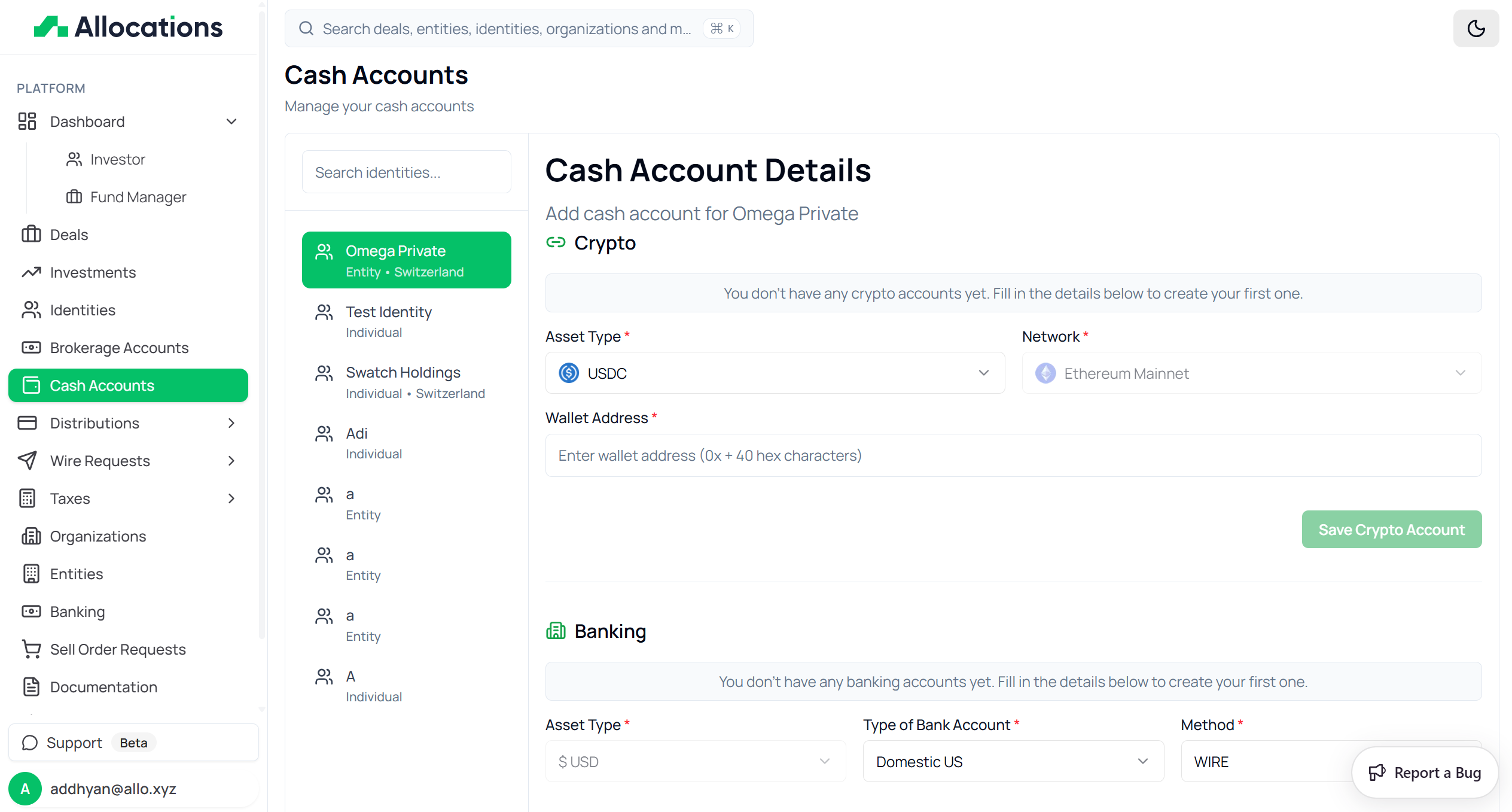
The **Cash Accounts** section allows users to link bank accounts or crypto wallets to their identities.
These accounts are used for:
* Receiving distributions
* Processing redemptions
* Receiving return of capital
* Handling exit proceeds
To access this page:
1. Go to **Cash Accounts** from the left sidebar.
2. Select the identity for which you want to add or manage a cash account.
## Manage Cash Accounts
The page is divided into two sections:
* Select Identity (Left panel)
* Cash Account Details (Right panel)
### Select Identity
On the left side, all available identities are listed.
Each identity shows:
* Name
* Identity Type (Individual or Entity)
* Entity Type (if applicable)
* Country (if available)
Click on the identity to add or update cash account details.
## Cash Account Types
Cash accounts can be added under two categories:
1. Crypto
2. Banking (Fiat)
## Crypto Account
Under the **Crypto** section, users can add a wallet for stablecoin distributions.
#### Required Fields:
* Asset Type (USDC or USDT)
* Network (e.g., Ethereum Mainnet)
* Wallet Address
Ensure that:
* The selected asset matches the intended distribution currency.
* The network is correct (incorrect networks may result in loss of funds).
* The wallet address is accurate.
After entering the details, click **Update Crypto Account** to save.
## Banking (Fiat) Account
Under the **Banking** section, users can add a traditional bank account.
#### Required Fields:
* Asset Type (USD)
* Type of Bank Account (Domestic US or International)
* Method (ACH or Wire)
### Account Details
Users must enter:
* Account Number
* Routing Number (for domestic accounts)
* Bank Name
* Bank Address
* Beneficiary Name
* Beneficiary Address
* Beneficiary Phone Number
* Memo (Optional)
All information must match official bank records to prevent transfer failures.
### Domestic vs International
#### Domestic US
* Typically requires Routing Number
* Supports ACH or Wire
#### International
* May require SWIFT/BIC codes
* Wire transfers are typically used
### Saving Cash Account
After completing all required fields:
1. Click **Save Banking Account**.
2. The account will be linked to the selected identity.
An identity can have multiple cash accounts if needed.
### Important Notes
* Cash accounts are identity-specific.
* Distribution payments will be sent to the selected cash account.
* Incorrect banking or wallet details may result in delays or failed transfers.
* Crypto accounts must match the network used for distribution.
---
# Agent Instructions
This documentation is published with GitBook. GitBook is the documentation platform designed so that both humans and AI agents can read, navigate, and reason over technical content effectively. Learn more at gitbook.com.
## Querying This Documentation
If you need additional information that is not directly available in this page, you can query the documentation by asking a question.
Perform an HTTP GET request on the following URL with the `ask` and `goal` query parameters:
```
GET https://docs.allocations.com/brokerage-and-cash-accounts/adding-cash-account.md?ask=&goal=
```
`ask` is the immediate question: it should be specific, self-contained, and written in natural language.
`goal` is what the user is ultimately trying to achieve, the reason they need the answer. Sharing it helps GitBook give you a better, more relevant answer. A goal is most helpful when it describes the outcome the user wants rather than restating the question. For example, with `ask=how do I create an API token`, a goal like `automate deployments from our CI pipeline` lets GitBook tailor the answer to that use case.
The response will contain a direct answer to the question and relevant excerpts and sources from the documentation.
Use this mechanism when the answer is not explicitly present in the current page, you need clarification or additional context, or you want to retrieve related documentation sections.